Saturday, 2 April 2016

, ,

10 tips for an awesome and SEO-friendly blog post

Writing a blog post -like all other writing- is a skill. In order to keep your reader interested, you should think about structuring your text and writing in an appealing style. You should help your readers to grasp the main idea of your post by providing headings, subheadings and clear paragraphs. If people understand and like your text, they are much more likely to share, like, tweet and link to your post. And that will increase your rankings! So, in order to improve your ranking in Google, you should definitely try to maximize your writing skills!
For some, writing for SEO purposes and writing to attract and keep attracting your audience could appear as two contradictory goals. I totally disagree with this. Indeed, if you not only want a good but also an SEO-friendly blog post, your text should be written in such a way that the words you want to be found for have a very prominent place. And, using your keywords too often severely damages the readability of your text. So, you definitely shouldn’t do that!
In this post, I would like to give some tips on writing blog posts that are both very readable as well as SEO-friendly. I genuinely think those two goals should (and easily can!) go hand in hand.

Elementary writing tips for good blog posts

Before anything, your blog post just has to be a good piece of writing! A lot of bloggers just begin to write when creating a new blog post. They just type what comes to mind. For some, this may be sufficient, because they are natural writing talents. Others may need some help. I always follow the next set of ‘rules’ myself.

1. Think before you write!

Think hard about the message of your text. What do you want to tell your readers? And what is the purpose of your text? What do you want you readers to do at the end of the page? Write down the answers to these questions before you begin writing.

2. Write down the structure of your blog post.

Start your post with creating a clear structure. Every post should have some sort of introduction (in which you introduce your topic), a body (in which the main message is written) and a conclusion (which should summarize the most important ideas or deduce some new idea). Write down what you want to write in all these three sections. You now have a kind of summary of your post. The real writing can begin!

3. Use paragraphs.

Everybody uses paragraphs, but make sure to use paragraphs that make sense. Do not start a new sentence on a new line, just because it looks nice. There should be a reason for making a new paragraph. Every paragraph should have a main idea or a main subject. Ask yourself what the main idea of each paragraph is. You should be able to grasp that main idea in only one sentence. If you need more sentences, you simply need more paragraphs!

4. Use headings.

Headings structure the entire page, so you should make sure to use headings. They are important for readability, but for SEO as well. Headings help Google to grasp the main topics of a long post and thus can help in your ranking. If you want people to find their way in your articles, you should use subheadings. Subheadings will lead people, help them scan your page, and make the structure of your articles that much clearer. Make sure that your keywords are used in the subheadings, but do not put your keyword in every subheading (as it will make the text unreadable).

5. Use signal words.

Signal words help people to scan through your text and help people to grasp the main idea. If you, for instance, have three reasons for wanting to sell a product, you should use signal words as: First of all, Secondly and Finally. Also, words as Nevertheless, Surely and Indeed also give a clear signal to your readers. Readers will instantly get that a conclusion will follow after words as Consequently, So or For this reason. Signal words are thus very important to structure your text.

6. Let other people read your post.

Before publishing your post, let someone else read your post first. Ask him/her whether or not he understands the main idea of your post. Correct typo’s and sentences that are not formulated correctly.

7. Optimize the length of your article.

Make sure your articles have a minimum of 300 words. Google likes long articles, if your article is too long though it might scare away users. So try to stop at around 700 words. And, as a general rule of thumb: try to put your search terms in about 1 to 2 percent of your text. So in an article of 300 words, you should mention your search terms 3 to 6 times.

8. Link to previous content.

If you already wrote some content about the topic of your current post, don’t forget to link to these posts. It will make your post stronger because you show some authority on the subject. Next to that, your link-structure is also of importance for your ranking in Google. You should read Joost his post about cornerstone articles if you want to read more about this.

9. Add content regularly.

Adding actual and functional information to your website will give Google the idea that your website is alive. If it’s not an active website, Google will crawl it less often and it might become less appealing to Google to include the page in the search results.

10. Use our Yoast SEO plugin.

Our Yoast SEO plugin actually helps you write an SEO-friendly blog post. If you want the help of our plugin you should start by choosing your focus keyword and entering it in the appropriate box. This is the most important search term you want people to find this particular page for. Our plugin actually measures many aspects of the text you are writing and helps with making your blog post SEO-friendly. We will describe the most important ones:
  • The plugin allows you to formulate a meta description. This description has to be a short text which indicates the main topic of the page. If the meta description contains the search term people use, the exact text will be shown by Google underneath your URL in the search results.
  • The plugin analyzes the text you write. It calculates a Flesch reading ease score, which indicates the readability of your article. The Flesch reading ease score for example takes into account the length of sentences.
  • The plugin does a pretty big number of checks. It checks whether or not you used your keyword in 5 important locations: the article-heading, the title of the page, the URL of the page, the content of the article and the meta-description. The plugin also checks the presence of links in your article and the presence of images in the article. It calculates the number of words and the density of usage of the focus keyword in the article. Above that, the plugin also checks whether or not other pages on your website use the same focus keyword, to prevent you from competing with yourself.
If you write a relatively SEO-friendly blog post (based on the aspects mentioned before) the plugin will indicate this with a green bullet. Writing pages with green bullets will help you improve the ranking of the pages on your website.
Note that not every dot has to be green for the overall score to be “good”. For instance, these are the results of this post, which does have a “Good” score:
content analysis Yoast SEO example
If you’re not on WordPress, we also have this Page Analysis tool available on our site. It’s still in beta, so we’d love your feedback!
Looking for more optimization? Check out our Yoast SEO Premium plugin!

Conclusion

The era in which some SEO tricks were sufficient to get your website to rank high in Google has long ended. Nowadays, good content has the highest likelihood to result in a higher positions in Google. And good content also leads to more Facebook likes and shares, tweets and return visitors to your website. Of course, you can do some extra things to maximize the SEO friendliness of your post, but most important is: just write a very, very good post!
Reference: yoast
,

What Is SEO Content? A Beginner's Guide to Creating Content for SEO

If you’re relatively new to the world of search marketing, you may have heard the term “SEO content” being thrown around in marketing meetings. This beginner’s guide is designed to answer three questions:
  1. What is “SEO content”?
  2. What types of SEO content are there?
  3. What is my SEO content strategy?
If you have any questions about SEO content creation that I don’t answer here, let me know in the comments and I’ll answer them here or in a future blog post.
Let’s get started!

What Is SEO Content?

To understand what marketers mean by SEO content, it’s helpful to break down the phrase into its component parts:
  • “SEO” refers to search engine optimization, or the process of optimizing a website so that people can easily find it via search engines like Google.
  • By “content,” we mean any information that lives on the web and can be consumed on the web (more on the various types of content below).
So, putting these two concepts together: SEO content is any content created with the goal of attracting search engine traffic.
I’m not going to tell you everything you need to know about optimizing your content for search engines here; that’s a whole ‘nother guide. But here’s a super-quick refresher on what you’ll need to do in order to SEO your web content:
  • Keyword Research: If you want to generate traffic through search, it’s best to do keyword research before you start writing. This way, you can focus on keywords for which a certain amount of search volume already exists – in other words, write toward topics that people are already searching for information about.
  • Keyword Optimization: Know where and how to use keywords in your content for maximum searchability. (SEOMoz offers a great guide to on-page optimization.)
  • Content Organization: The content on your site should be organized in a logical way. This is not only good for SEO, it also helps visitors on your site find other related content easily. (The longer they stay on your site, the better.)
  • Content Promotion: Increase visibility to new content you create by sharing it on social networks and building links to your content (both internally and from external sites).
SEO Keyword Tool
A keyword research tool like the Keyword Niche Finder will help you identify specific topics to target in your SEO content.

A Quick Word on Intentions

It’s important to keep in mind that if search engine traffic is your only goal, your results will probably suffer. In order to please both the search engines (who will reward you with high rankings over time) and potential customers and return visitors, you need to offer value above and beyond search engine optimization. In other words, don’t produce “thin” content that ranks and get clicks, but doesn’t provide any additional value to the search engine user. Sites that promote “thin,” low-value content run the risk of being penalized by Google; they also tend to have high bounce rates and low conversion rates.

Types of SEO Content

SEO content can include any of the following:
  • Product Pages – These are the bread and butter of any retail e-commerce site. A good product page can serve as both SEO content and a PPC landing page.
  • Blog Posts – A blog is one of the easiest ways to create a regular stream of SEO content. In general, blog posts are more engaging and more likely to attract links than product pages, so they can be a great way to build some authority for your site. (Keep in mind that blogs are very flexible, and you can use them to host any of the below types of content in this list.)
  • Articles – Think news article, interview, or feature piece. This is the main kind of content you’ll find on most newspaper- or magazine-style websites.
  • Lists – A list is really just a kind of article, but framing it as a list (such as “10 Ways to Lower Your Energy Bill” or “101 Things I Hate About Google”) makes it easier to scan. These types of titles also seem to be more clickable when found in search results or in social media feeds.
  • Guides – A guide is a longer piece of content that explains in detail how to do something. (Guides are often broken up onto multiple web pages, though it’s a best practice to allow users to view long content as a single page if they wish.) You can post a full guide on your website, or you can post a summary or excerpt, requiring visitors to fill out a registration form to read the full guide. This can be a good way to generate leads, but keep in mind that putting up a registration wall will likely reduce the amount of SEO traffic you can drive to that guide.
  • Videos – In general there are fewer videos on the web than pages of text; consequently, it can be easier to rank on the first page for a competitive keyword by creating a video instead of an article. Depending on what type of site or business you run, videos can be a great way to attract and reach an audience. Consider creating video tutorials of how to use your products. Or illustrate a process that is related to your business – for example, a plumber could make a video showing how to unclog a sink. (A note on SEO: You might consider including a text transcript of your video. Here are some additional tips for optimizing videos.)
  • Infographics – Infographics, or large-format images that contain a lot of data (often in the form of graphs or charts) on a single subject, can rack up a lot of page views and links. However, because so much of the content is embedded in the image and therefore not readable as text by search engines, it’s important to carefully optimize the rest of the page. You can use one of these five freeinfographic templates to get started.
  • Slideshows – A slideshow is a way to display a series of related images. Sometimes pictures are more important than text – say you’re trying to show what all the stars wore to the Oscars. Here again, SEO of your title, captions, image file names and so on is important because there is less for the search engines to “read.”
  • Glossaries – I swear more people use Google to look up terms than they use a dictionary. (Do you even know where your dictionary is?) If you work in a specialized industry, a well built-out glossary can be a good way to capture some search traffic. Think cooking terms, medical terms, fashion terms, architectural terms …
  • Directories – A directory is a useful taxonomy of links to sites or resources around a given topic. For example, a perfume blog might create a directory of places to buy perfume, from major department stores to independent shops around the country.
These are just some of the basic types of SEO content, but don’t let this list limit you – the possibilities are virtually endless.

How to Develop an SEO Content Strategy

If you’ve been producing content in a haphazard manner, hoping and praying that some of it eventually ranks, it’s time to buckle down and commit to a more methodical SEO content strategy for the web.
Here are four steps to defining and refining your SEO content strategy:

Define your goals

First, determine your goals as a website or business. Are you looking to drive sales through your website? Do you monetize your site via ads and therefore just want to increase traffic and return readership? Your goals will determine what types of content you should focus on.
If you’re primarily trying to drive product sales, your primary focus should be attractive, informative product pages that are optimized for both search and conversions. Your secondary focus could be helpful blog content that illustrates when and how to use your products, linking to those pages where relevant (it’s best if your blog is not entirely self-promotional, though).
If your site operates on an advertising model and the goal is to attract new readers through search, you’ll want to focus on rich content (such as long-form articles or video resources that are informative, entertaining or both) with “stickiness” (“sticky” content keeps visitors on your site longer or encourages them to return).

Consider your audience

Know your audience – surveys and your analytics software can help you get a better picture of your typical visitor or client. Consider developing marketing personas, or characters that represent your ideal site visitors and customers. Then think about what kinds of content those personas would be looking for.
For example, if you operate a B2B website that targets C-level executives, you might want to create high-level white papers that can be downloaded and saved to read later.
If your business targets teens and tweens, you might want to focus on frequent updates with less text and more images and video. You’ll also want to be sure your site is optimized for mobile usage.

Create an editorial calendar

Once you have an idea of who you are targeting and why, you can start to build out an editorial calendar. An editorial calendar is a schedule that dictates when you will publish new content and what type of content it will be. This will help you stick to a regular schedule (it’s especially important to create new content on a regular basis if you have a blog), as well as prevent you from scrambling to come up with a topic for new content at the last minute.
A few tips for creating and adhering to an editorial calendar:
  • Use Outlook (or Google Calendar) – Share the editorial calendar with your whole marketing team. Set up reminders for authors so they get a notification when a deadline is coming up.
  • Consider creating ongoing features – For example, a food blog might do a meatless recipe every Monday. Many blogs do link roundups once per week (including this one). Create a category page for each ongoing feature, so visitors can find all of your Meatless Monday recipes or link roundups in one place.
  • Give yourself plenty of lead time when producing more complicated types of content, such as videos and infographics. These often need multiple rounds of edits to perfect and can be more complicated to optimize for search.
  • Don’t plan too far out in advance – Calendars often get derailed after a month or two, due to changes in marketing goals, budgets, or staff, so don’t try to plan out a schedule for the next year and risk wasting a lot of time and effort.

25guide.jpg

Analyze and re-assess

Finally, stay on top of your site’s analytics. Regularly analyze your SEO content to see what’s working and what isn’t. Good measures of success and engagement include page views, links, comments (on blog posts and some other types of content), social shares (Facebook likes, tweets, etc.), and conversion rates. Your analysis should have two goals:
  • Study your successes so you can repeat those strategies – Look for patterns. Does your audience love videos? Then make more videos! Adjust your editorial calendar going forward so you can focus more time and effort on the content types that really resonate.
  • Carve out time for updating and improving older SEO content – If you tried to optimize an article for a certain keyword, but it’s getting more traffic for a different variation of that keyword, then go back in and re-optimize it for the new keyword. You might be able to significantly increase traffic by putting that keyword in the title, for example.
There you have it – SEO Content 101. As mentioned above, please let me know in the comments if you have other questions about creating and optimizing content for SEO.

SEO Basics: 8 Essentials When Optimizing Your Site

Basic search engine optimization (SEO) is fundamental. And essential. SEO will help you position your website properly to be found at the most critical points in the buying process or when people need your site.

What are search engines looking for? How can you build your website in a way that will please both your visitors/customers, as well as Google, Bing, and other search engines? Most importantly, how can SEO help your web presence become more profitable?

During the Introduction to SEO session at SES New York, Carolyn Shelby (@CShel), Director of SEO, Chicago Tribune/435 Digital, fully explained the extreme value SEO can deliver to a site, and stressed the importance of basic SEO using the following analogy:

“Skipping the basics and spending all your time and money on social and ‘fancy stuff’ is the same as skipping brushing your teeth and showering, but buying white strips and wearing expensive cologne,” Shelby said.

Although the Introduction to SEO session was intended for industry newcomers, Shelby’s tips offer important reminders for even experienced SEO professionals who have been optimizing sites for years.

What is SEO, Exactly?

The goal of foundational SEO isn’t to cheat or “game” the search engines. The purpose of SEO is to:

Create a great, seamless user experience.
Communicate to the search engines your intentions so they can recommend your website for relevant searches.
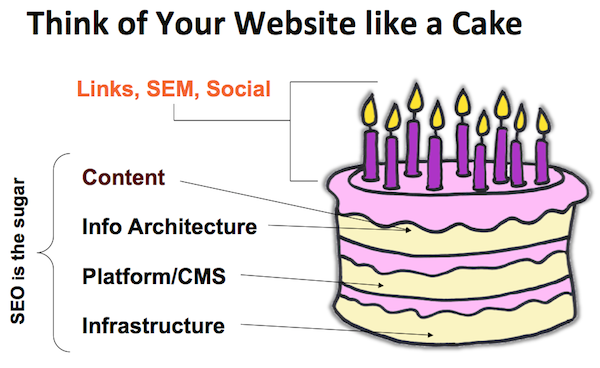
1. Your Website is Like a Cake

think-of-your-site-like-a-cake

Your links, paid search, and social media acts as the icing, but your content, information architecture, content management system, and infrastructure act as the sugar and makes the cake. Without it, your cake is tasteless, boring, and gets thrown in the trash.
theyre-both-cakes-right

2. What Search Engines Are Looking For

Search engines want to do their jobs as best as possible by referring users to websites and content that is the most relevant to what the user is looking for. So how is relevancy determined?

Content: Is determined by the theme that is being given, the text on the page, and the titles and descriptions that are given.
Performance: How fast is your site and does it work properly?
Authority: Does your site have good enough content to link to or do other authoritative sites use your website as a reference or cite the information that’s available?
User Experience: How does the site look? Is it easy to navigate around? Does it look safe? Does it have a high bounce rate?
3. What Search Engines Are NOT Looking For

Search engine spiders only have a certain amount of data storage, so if you’re performing shady tactics or trying to trick them, chances are you’re going to hurt yourself in the long run. Items the search engines don’t want are:

Keyword Stuffing: Overuse of keywords on your pages.
Purchased Links: Buying links will get you nowhere when it comes to SEO, so be warned.
Poor User Experience: Make it easy for the user to get around. Too many ads and making it too difficult for people to find content they’re looking for will only increase your bounce rate. If you know your bounce rate it will help determine other information about your site. For example, if it’s 80 percent or higher and you have content on your website, chances are something is wrong.

4. Know Your Business Model

While this is pretty obvious, so many people tend to not sit down and just focus on what their main goals are. Some questions you need to ask yourself are:

What defines a conversion for you?
Are you selling eyeballs (impressions) or what people click on?
What are your goals?
Do you know your assets and liabilities?
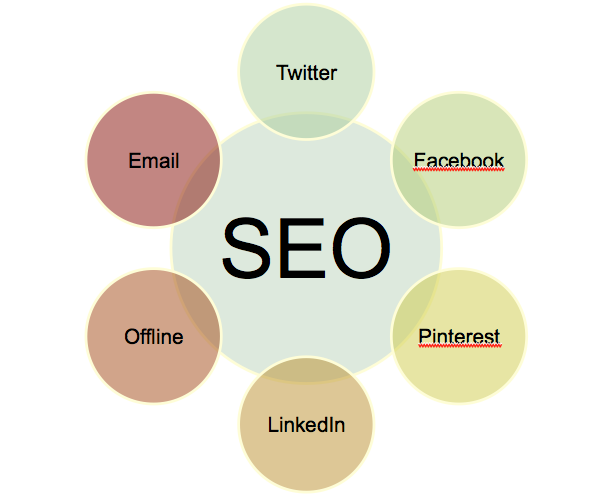
5. Don’t Forget to Optimize for Multi-Channels
multichannel-optimization

Keyword strategy is not only important to implement on-site, but should extend to other off-site platforms, which is why you should also be thinking about multi-channel optimization. These multi-channel platforms include:

Facebook
Twitter
LinkedIn
Email
Offline, such as radio and TV ads
Being consistent with keyword phrases within these platforms will not only help your branding efforts, but also train users to use specific phrases you’re optimizing for.

6. Be Consistent With Domain Names

Domain naming is so important to your overall foundation, so as a best practice you’re better off using sub-directory root domains (example.com/awesome) versus sub-domains (awesome.example.com). Some other best practices with domain names are:

Consistent Domains: If you type in www.example.com, but then your type in just example.com and the “www” does not redirect to www.example.com, that means the search engines are seeing two different sites. This isn’t effective for your overall SEO efforts as it will dilute your inbound links, as external sites will be linking to www.example.com and example.com.
Keep it Old School: Old domains are better than new ones, but if you’re buying an old domain, make sure that the previous owner didn’t do anything shady to cause the domain to get penalized.
Keywords in URL: Having keywords you’re trying to rank for in your domain will only help your overall efforts.

7. Optimizing for Different Types of Results

In addition to optimizing for the desktop experience, make sure to focus on mobile and tablet optimization as well as other media.

Create rich media content like video, as it’s easier to get a video to rank on the first page than it is to get a plain text page to rank.
Optimize your non-text content so search engines can see it. If your site uses Flash or PDFs, make sure you read up on the latest best practices so search engines can crawl that content and give your site credit for it.
8. Focus on Your Meta Data Too

Your content on your site should have title tags and meta descriptions.

Meta keywords are pretty much ignored by search engines nowadays, but if you still use them, make sure it talks specifically to that page and that it is also formatted correctly.
Your meta description should be unique and also speak to that specific page. Duplicate meta descriptions from page to page will not get you anywhere.
Title tags should also be unique! Think your title as a 4-8 word ad, so do your best to entice the reader so they want to click and read more.

Summary

You should always keep SEO in the forefront of your mind, and always follow best practices. Skipping the basics of SEO will only leave your site’s foundation a mess and prevent you from fully maximizing revenue opportunities.

Reference: searchenginewatch
,

How to Write SEO Content

Search Engine Optimization is a technique used in web publishing to increase web page visibility and traffic for a higher ranking in search engines and more readers. Writing an article using Search Engine Optimization requires good writing skills to make the article interesting and easy to read. Strategic placement of key phrases and keywords in the text and the inclusion of hyperlinks will boost the readership of your page. Read the following steps to learn how to write an article using Search Engine Optimization.
Step 1
Outline your article.
Articles should be well written, engaging, and informative. They should present a new angle on a specific topic. A good hook in the beginning along with useful information will make people want to continue reading it. Your article should be useful, entertaining, or otherwise valuable.
A well-written article with good content will attract more traffic, meaning many readers visit your site. This makes your article more attractive to link marketers (people that link their sites to yours) and increases the likelihood of advertisers wanting to use your page for their advertisements.
Google search engine provides a great weight on the title of articles and blogs. That is why it is crucial that the keyword phrase is present on the title as an important part of an effective SEO content.
Image titled Write an Article for SEO Step 2

                                                                               Step 2
Make a list of key phrases and keywords for your article. This is important so that your publisher can include it in the metadata of the page, which is part of the HTML code.
It will be very helpful for the readers and Google ranking if the article is divided with subheadings, as readers appreciate it more when they can read an article with ease. As an important reminder, most people who browse the sites are only skim-reading on the internet. That is why with a subheading they are likely to finish the article and stay on the page for a longer period.
Keywords and key phrases are words or phrases that people would use to search for information on the topic which you are about to write. For example, key phrases for an article on moving could be "packing and moving" or "loading a moving truck," while keywords could be "moving," "relocation," or "relocating."
Key phrases and keywords are registered by "spiders," which are scripts that search engines send out to every page on the Internet. Spiders "crawl" across web pages and websites and analyze them for content and quality of content. One way they do this is by registering the keywords and key phrases to determine the subject of a page; but they also detect how often each keyword or phrases are used, whether a page is grammatically correct, and what types of inbound and outbound hyperlinks there are. Hyperlinks are links to other pages that are somehow relevant to your topic.
Step 3
Write your article.
Make sure it's grammatically correct with no spelling mistakes.
Give your article a title.
Break it up into short paragraphs with subheaders.
Use the most important keywords and key phrases as early in the article as possible, preferably in the first sentence, and in the first paragraph.
Do not overuse keywords or key phrases. Intersperse them naturally throughout the text in the natural reading rhythm of the article. The recommended keyword density is 1-3% [citation needed].
Include the most important keywords and key phrases in titles and subheaders.
If it makes sense in the text, put keywords and key phrases in bold or italics.
As too many keywords are present on the content, Google search engine will assume that the keyword are stuffing. Do not make a rookie mistake and place those keyword phrases on the 155 - 200 words
As the title includes the keyword phrase, the first sentence of the article should also have the keyword. To break the redundancy, try starting the article through a question. As the keyword is already inserted in the sentence, all you have to do is BOLD it. This will emphasize the keyword and it will make a huge effect on the Google algorithm as it scanned the article.
Like it was done on the first sentence, the keyword should also be present on the last sentence to emphasize the keywords more.
Step 4
Include hyperlinks in the article.
Hyperlinks are links to another web page that is relevant to your topic. You can highlight a word or phrase and add the web address to which you want to link. Make sure every link is a quality website that offers sound information and easy navigation.
Step 5
Build links to your article.
Even if you have written a great article, you must let the world know about it. Simply, share a link to your new article on Facebook, Twitter or Tumblr and encourage friends to re-share it.
Making the keywords, a clickable link allows Google search to emphasize the keywords more and it should be done on the beginning and end of an article where the keywords are mostly located.
Step 6
Make it easy to share the content
The more Google search will see the content on other websites the more it will rank as a whole. That is why it should be shareable so that it can garner rank on the search engine.